
What Your Shared Links Actually Look Like on Social Media (And a Free Tool That Shows You)

Pick any link you've posted in the last month. Your latest blog post, your newsletter signup, your Linktree, your Liinks page — any of them.
Now ask yourself: when you paste that URL into a tweet or a LinkedIn comment, what does it actually look like? Is there a nice image? A bold title? A one-line description that makes someone want to tap? Or is it a plain gray box with a truncated URL and nothing else?
You probably don't know. Almost nobody does. And that's a problem, because the preview is the thing people actually see — not the URL itself. Dozens of potential clicks a month quietly vanish into "blank card, keep scrolling" territory for no reason other than a missing Open Graph tag nobody knew was missing.
Liinks just shipped a free Open Graph Debugger that closes that gap. Paste any URL, hit Debug, and you'll see:
- Exactly which OG tags the page has (and which are missing)
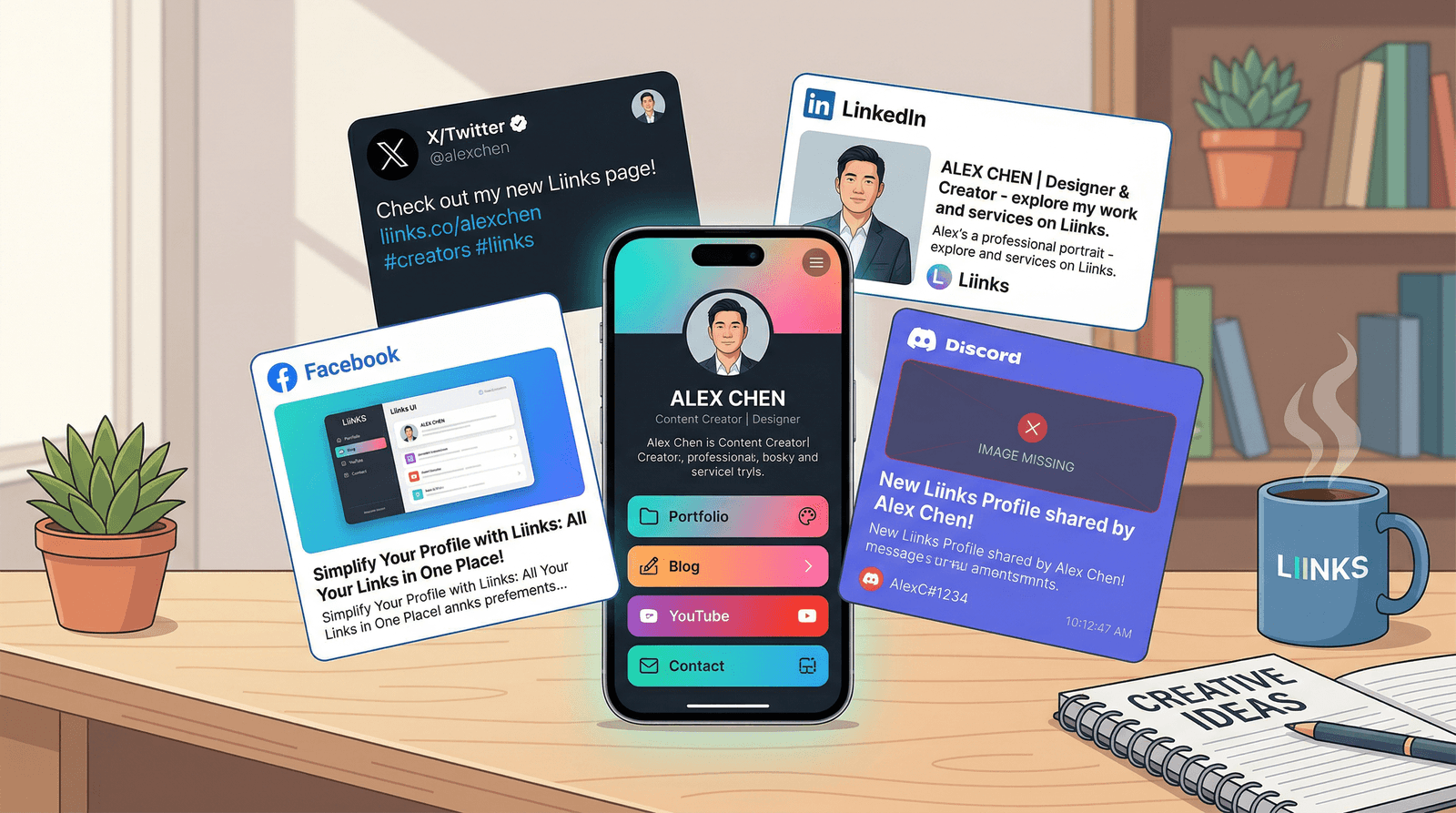
- Live previews of how the link will render on Facebook, X/Twitter, LinkedIn, and Discord
- A warnings list that flags anything broken, truncated, or absent
- The full meta-tag dump for anything you want to dig into
No account. No install. Just paste and go.
Wait, What Are Open Graph Tags?
Open Graph is a protocol Facebook introduced in 2010 that lets a web page tell social platforms how it should be presented when shared. When you drop a URL into X and a rich preview card appears, that card came from OG tags embedded in the page's HTML. They look like this:
<meta property="og:title" content="My Liinks Page" />
<meta property="og:description" content="All my links in one place." />
<meta property="og:image" content="https://liinks.co/og-image.png" />
<meta property="og:url" content="https://liinks.co/charlie" />
Every major platform reads these tags: Facebook, X/Twitter, LinkedIn, Discord, Slack, iMessage, Telegram, WhatsApp. They don't always use the exact same fields — X has its own twitter:card family of tags for fine-grained control, and LinkedIn caches preview data more aggressively than the others — but the OG tag family is the shared foundation.
Which means: if your OG tags are broken, missing, or pointing to an image that no longer exists, your preview is probably broken everywhere at once. And you'll never notice because you're not the one seeing it.
How to Use the Liinks Open Graph Debugger
The tool lives at liinks.co/open-graph-debugger. Here's the entire flow.
Step 1: Paste a URL
Drop any public URL into the input field — your Liinks page, your personal website, a product landing page, a blog post, anything. The tool accepts bare domains (example.com) or fully-qualified URLs.
Step 2: Hit Debug
The debugger fetches the page, parses its HTML, and extracts every OG tag, Twitter-card tag, and relevant meta tag it finds. This takes a couple of seconds.
Step 3: Read the Validation Summary
At the top of the results you'll see either a green "all essential tags are present" checkmark or a list of warnings. Common warnings:
- Missing
og:image— your link will show without a thumbnail, which is the single biggest conversion killer in the list - Missing
og:title— platforms fall back to the page's<title>tag, which is usually less optimized for sharing - Missing
og:description— the preview card has no subtitle at all og:imagewrong dimensions — platforms have minimum resolutions and aspect ratios, and an undersized image gets downscaled awkwardly- Mismatched canonical URL — causes caching issues across platforms
Step 4: Scroll Through the Previews
Below the warnings, the tool renders four live preview cards — one each for Facebook, X/Twitter, LinkedIn, and Discord. These are styled to match each platform's actual share card, so what you see is what people see.
This is the most useful section by a mile. Most "OG tag checkers" show you the tags but not what the tags actually produce. Seeing all four previews side-by-side reveals platform-specific problems fast. A card that looks great on LinkedIn might be cropping weirdly on X because the image aspect ratio is wrong. Facebook might be truncating your description because it's over the character limit. Discord might be falling back to a plain link because it can't reach your image domain.
Step 5: Check the Tags Table
The bottom of the report is a full dump of every OG and meta tag the tool found, in a clean two-column table. This is where you go when the previews look wrong and you're trying to figure out which specific tag is the culprit.
The Five Problems This Tool Usually Catches
After poking at a handful of link-in-bio pages, newsletters, and personal sites, the same issues keep showing up. Here's what you should expect to find.
1. No og:image At All
This is the most common — and most consequential — failure. Without an og:image, the preview card renders as a thin link with no thumbnail. On X and LinkedIn specifically, this tanks engagement because the card takes up maybe a third of the real estate of a properly-sized preview. On Facebook it's even worse: a link with no image essentially disappears in the feed.
Fix: Add an og:image meta tag pointing to a 1200×630 PNG or JPG hosted on a public CDN. If you're on Liinks, this is set automatically from your profile image and cover photo — you don't have to touch anything.
2. og:image Is Broken or Served From a 404
Even worse than no image is a stale one — a reference to a file that used to exist but has since been deleted or moved. Platforms that cached the old image will keep showing it; platforms that didn't will fall back to a blank card. You get inconsistent previews across platforms with no obvious cause.
Fix: Use the debugger to verify the og:image URL actually loads. If it doesn't, either re-upload the image or update the tag to point to a new location.
3. Truncated Titles and Descriptions
Facebook, X, and LinkedIn all impose character limits on the visible portion of the title and description. If your OG title is 100 characters and the platform shows 60, the last 40 characters get cut — sometimes mid-word. The tool surfaces truncation warnings so you can rewrite the tags to fit.
Fix: Keep og:title under 60 characters and og:description under 155. If you need more room, the primary platforms typically show more in their DM/message contexts than in the main feed.
4. No Twitter-Specific Tags
X/Twitter uses twitter:card, twitter:title, twitter:description, and twitter:image for its own preview rendering. When these are missing, X falls back to the general OG tags — which usually works fine, but not always. The debugger flags when Twitter-specific tags are absent and shows you what X is actually rendering.
Fix: Add a basic set of twitter: tags alongside your OG tags. Setting twitter:card to summary_large_image is the single biggest win — it gives you the full-width image preview instead of a tiny square.
5. Mixed HTTP/HTTPS Resources
If your page is HTTPS but your og:image points to an HTTP URL, some platforms will refuse to load the image at all for security reasons. The preview falls back to a broken state. This one is particularly sneaky because it doesn't show up as a "missing tag" — the tag is there, the image just never renders.
Fix: Always use HTTPS URLs for OG images. The debugger will flag this explicitly.
Why This Matters More Than You Think
Every link you share on social media is a piece of brand storytelling. When a broken preview shows up in someone's feed, it's not just a missed click — it subtly signals that you don't maintain your own stuff. Polished previews do the opposite: they build credibility before anyone even taps through. They're also the main thing separating a link that stops the scroll from a link that becomes invisible.
If you want to go deeper on the bigger picture, our post on what your link in bio says about you before anyone ever clicks walks through the entire perception layer of a shared page. The OG debugger is the technical cousin of that piece — it gives you a concrete checklist for the part of the first impression that's actually under your control.
Pair the debugger with a good baseline: set your OG image once, write titles and descriptions that match your brand voice, and spot-check quarterly. Combine it with our SEO for people who don't want a website guide for the broader set of meta tags that affect both search and sharing, and you've covered most of the discoverability stack.
How Liinks Pages Handle Open Graph Automatically
If you're using Liinks as your link-in-bio, most of this is handled for you. Every Liinks page automatically generates OG tags from your profile data — title, description, profile picture, and cover image — and serves them with the right dimensions for Facebook, X, LinkedIn, and Discord. You can still override the defaults from your profile settings if you want to customize the share card copy for a specific campaign.
That's also why the debugger is free for non-customers: if you run it against your Linktree or Beacons page and the previews come back broken, swapping to Liinks is an easy fix. But even if you don't, the tool is useful on its own — we wanted a clean, modern OG debugger that didn't require signing into Facebook's developer portal or dealing with LinkedIn's notoriously aggressive preview cache.
If you're already managing UTM tracking alongside your social sharing, pair this debugger with the free Liinks UTM Link Builder so you can verify previews and measure traffic from the same workflow.
TL;DR
- Open Graph tags are HTML meta tags that control how your URL looks when shared on Facebook, X/Twitter, LinkedIn, Discord, and most other platforms.
- Missing, broken, or truncated OG tags are one of the biggest invisible causes of low click-through rates on shared links.
- The new free Liinks Open Graph Debugger at liinks.co/open-graph-debugger fetches any URL, validates its OG tags, shows live previews for four platforms, and flags common issues.
- The most common problems to watch for: no
og:image, brokenog:image, truncated titles, missing Twitter-specific tags, and mixed HTTP/HTTPS resources. - Liinks pages generate proper OG tags automatically — you can still customize them per profile from your settings.
Audit Your Social Previews Now
Take 30 seconds, head to liinks.co/open-graph-debugger, and paste your Liinks page, your newsletter URL, or whichever link you share most often on social. See what's there, what's missing, and how it's rendering across four different platforms. If the previews look great, you know you can keep sharing with confidence. If they don't, now you know exactly what to fix.
And if you'd rather have all of this handled automatically — polished OG tags, responsive previews, and a fully customizable link-in-bio page — Liinks sets it up in minutes with no developer tools required.