The Liinks Public API lets you manage your profiles, blocks, styles, and data programmatically through a REST interface. It's designed for developers, agencies, and AI agents that need to build or update Liinks pages without using the dashboard.
Who can use the API?
The Public API is open to every Liinks account. There is no plan requirement and nothing to switch on: go to Settings > API Keys in your dashboard, create a key, and start building.
Plan limits still apply to the things they always applied to. Creating extra managed profiles needs a Pro plan, for example, because that is a Pro capability wherever you do it. But reading and editing the profile you already have is available to everyone.
Getting started
Create an API key
- Go to Settings in your admin dashboard.
- Scroll down to the API Keys section.
- Click Create API Key.
- Give your key a descriptive name (e.g., "Zapier integration" or "Content sync").
- Copy the key immediately -- it will only be shown once.
If you lose a key, revoke it and create a new one.
Authenticate your requests
Include your API key in the Authorization header of every request:
Authorization: Bearer liinks_live_xxxxxxxxxx
Base URL
All API endpoints are served from:
https://liinks.co/api/v1
What you can do
Profiles
- List profiles --
GET /profilesreturns all profiles associated with your account. - Get a profile --
GET /profiles/{profileId}retrieves a single profile by ID. - Create a profile --
POST /profilescreates a new managed profile (requires a Pro plan, which is what allows multiple profiles). - Update a profile --
PATCH /profiles/{profileId}updates profile fields like display name, bio, tagline, profile picture, and social links. - Delete a profile --
DELETE /profiles/{profileId}permanently removes a managed child profile. Your own profile cannot be deleted via the API.
Blocks
- List blocks --
GET /profiles/{profileId}/blocksreturns all blocks on a profile. - Get a block --
GET /profiles/{profileId}/blocks/{blockId}retrieves a single block. - Create a block --
POST /profiles/{profileId}/blocksadds a new block (link, text, divider, media, or folder). Some dashboard-only block types, such as forms and subscribe blocks, can't be created through the API yet: add those from the editor. - Update a block --
PATCH /profiles/{profileId}/blocks/{blockId}modifies an existing block. - Delete a block --
DELETE /profiles/{profileId}/blocks/{blockId}removes a block. - Reorder blocks --
POST /profiles/{profileId}/blocks/reorderchanges the display order of blocks on a tab.
Styles
- Get styles --
GET /profiles/{profileId}/stylesreturns the current design settings for a profile. - Update styles --
PATCH /profiles/{profileId}/stylesmodifies fonts, colors, backgrounds, and other design options.
Pages
- List pages --
GET /profiles/{profileId}/pagesreturns all pages on a profile. The default home page is always included as the first entry. Use the returned page IDs with the?pageId=parameter on block endpoints to manage blocks on a specific page.
In the dashboard these are called tabs: each page this endpoint returns is one tab on your Liinks page. The API keeps the pages and pageId names for stability.
Form submissions
- List submissions --
GET /profiles/{profileId}/form-submissionsreturns form submissions across all forms on the profile, newest first. Each submission includes the form title, answers, and a timestamp. Supports a?since=parameter for polling: pass the latestcreatedAtfrom your previous response to retrieve only new submissions.
Subscribers
- List subscribers --
GET /profiles/{profileId}/subscribersreturns email subscribers on the profile, newest first. Subscribers are created when someone fills out a form with subscriber mode enabled. Also supports the?since=parameter for polling.
Analytics
- Performance overview --
GET /profiles/{profileId}/analyticsreturns one performance report for a date range: views, visitors, clicks, click-through rate, each compared against the previous period, plus a time series and your blocks and social icons ranked by clicks. Pass?interval=to choose the granularity of the series and?unique=trueto count unique visitors rather than raw events. - Traffic breakdown --
GET /profiles/{profileId}/analytics/breakdowngroups traffic by one dimension. Pass?dimension=with one ofcountry,region,city,referrer,referrer_source,referrer_channel,utm_source,utm_medium,utm_campaign,device,browser, oros.
These are the same numbers the Analytics tab shows, so a script or an assistant can answer "how did my page do this week" without opening the dashboard.
Screenshots
- Capture a screenshot --
POST /profiles/{profileId}/screenshotrenders your live page in a headless browser and returns one or more JPEG images. This is useful for verifying what your page looks like after making changes via the API. The response includes an array of page images in top-to-bottom order, each with a public CDN URL. You can customize the viewport size (defaults to 375x812 for mobile) and the maximum number of pages to capture.
Image hosting
When creating or updating profiles and blocks, you can pass a public image URL for any profile picture, thumbnail, or background. Liinks will fetch the image and re-host it on a CDN for you, so you don't need a separate upload step.
Interactive documentation
Full endpoint details, request/response schemas, and live examples are available in the interactive API docs:
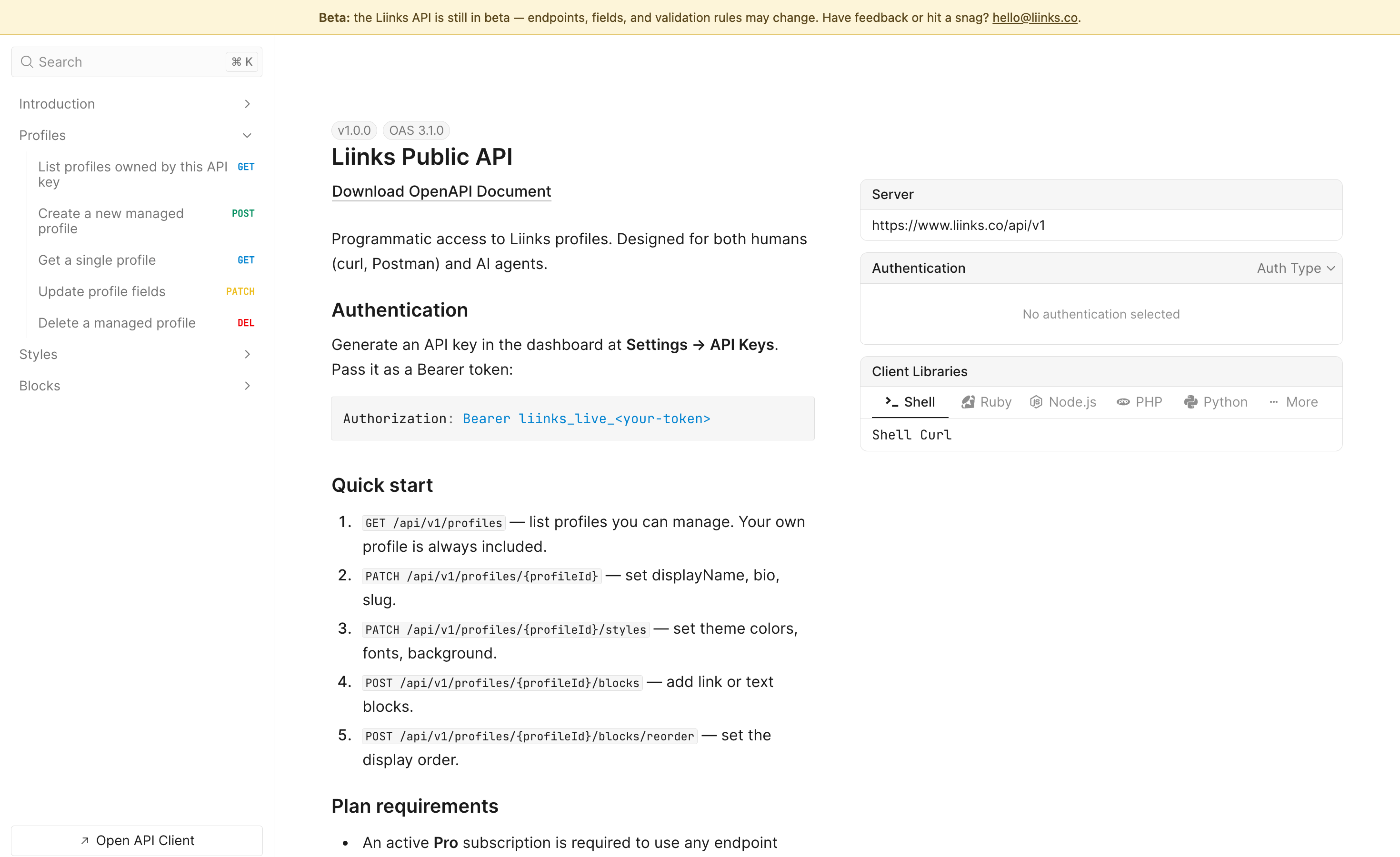
The docs are powered by the OpenAPI specification, which you can also access directly at /api/v1/openapi.json. If you're building with AI agents, liinks.co/llms.txt provides a machine-readable overview of the API for LLM-based tools.
Using an AI assistant instead
If you'd rather describe a change than write the request, Liinks also runs an MCP server. Point Claude, ChatGPT, Cursor, or another MCP-capable client at it with the same API key, and it can read and edit your page for you. See Connect an AI Assistant (MCP).
liinks.co/developers collects both paths in one place, along with the error model, current rate limits, and our versioning policy.
Managing API keys
You can view and manage all of your API keys from Settings > API Keys in the dashboard. Each key shows:
- The key name and prefix
- When it was created
- When it was last used
To revoke a key, click Revoke next to it. Revoking a key immediately stops any integrations using it. This cannot be undone -- you'll need to create a new key and update your integrations.
Rate limiting
API requests are rate-limited to protect service quality. If you exceed the limit, the API returns a 429 status code with a retryAfterSeconds value in the error response. Wait the indicated time before retrying.
Error handling
All errors follow a consistent format:
{
  "error": {
    "code": "validation_error",
    "message": "Human-readable description of what went wrong.",
    "details": {}
  }
}
Common error codes include validation_error, unauthorized, not_found, rate_limited, and conflict.
Need help?
If you have questions about the API or run into issues, contact our support team. For detailed endpoint documentation, visit the interactive API docs.