There are two levels of customization: individual blocks, and your page as a whole.
Customizing blocks
Each block can be customized in many ways. You can adjust a block's layout, add a title, description, and label, and attach an image, icon, or emoji. You can also add animations and per-block custom styles.
The Styles panel
Click Edit page in the sidebar to open the editor. The Styles panel on the right applies styles to your entire page and all the blocks on it:
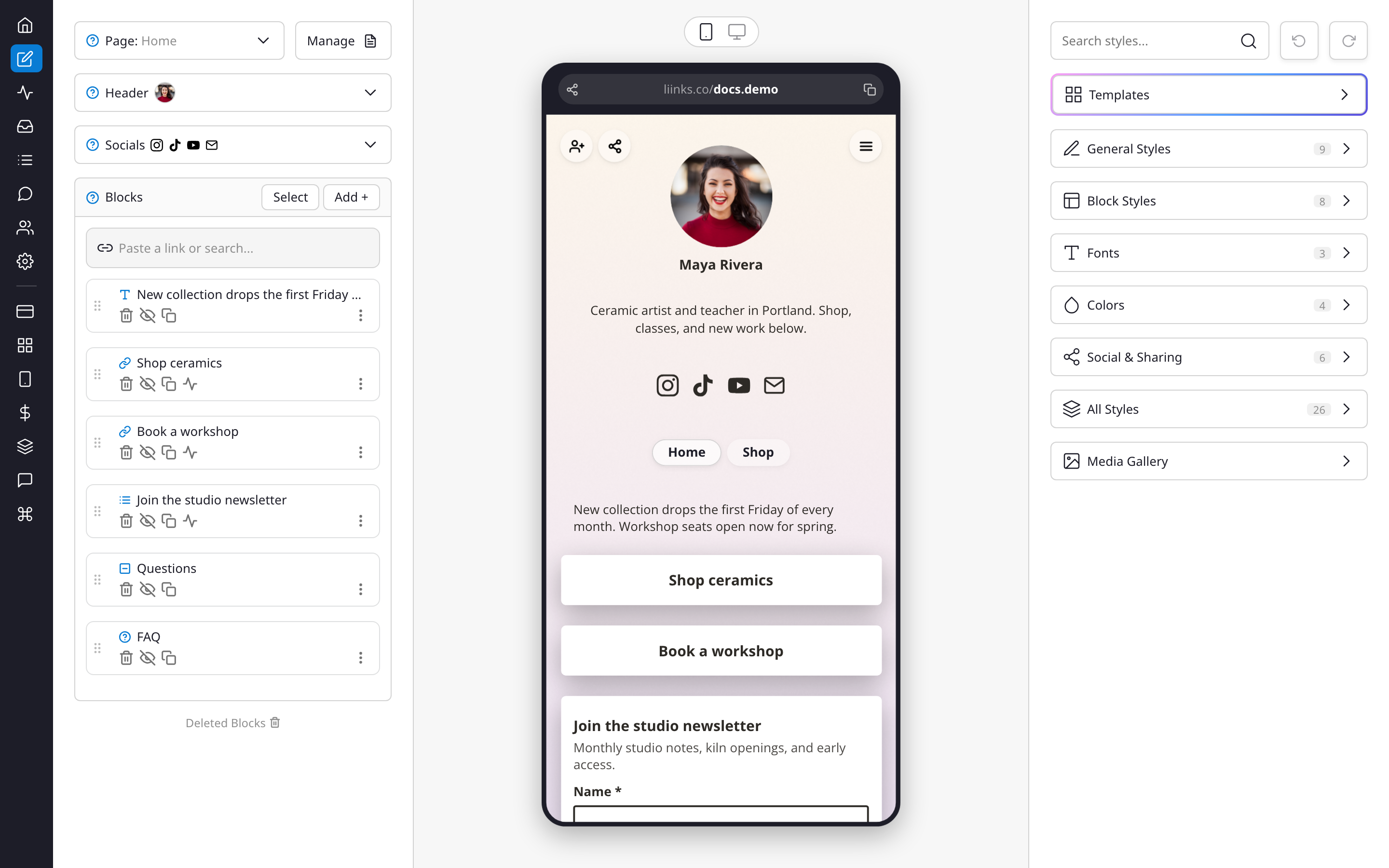
- Themes: 60 complete looks to start from. A theme changes your colors, fonts, background, and layout in one click, and never touches your blocks. Then tweak anything to your liking.
- General styles: header layout, background, profile picture, and page-wide settings
- Block styles: shape, shadows, borders, and corner rounding for your blocks
- Heading styles: how your headings look (appears once your page has one)
- Fonts: title and body typefaces
- Colors: every color setting in one place
- Social & sharing: the share, search, save contact, and QR code buttons, plus branding and your logo
- All styles: every setting on one list
The search field at the top of the panel finds any individual style setting quickly, and the arrows beside it undo and redo your changes. See Design options for a tour of every setting.
Your Media gallery, where the images used across your page live, opens from the button at the bottom of your block list.
For design inspiration, the Liinks customers gallery features dozens of real pages showing how different content types and styles come together.